General FAQs
FAQ:
1. What is this platform about?
This platform allows musicians to create profiles, upload their music, and sell it directly to users at their own chosen price.
2. Who are the main users of this platform?
There are three main users:
Musicians: They register, upload, and sell their music.
End Users: They can purchase music by scanning QR codes and making payments.
Admin: They manage the platform from an administrative panel, handling users, music, and financial data.
3. What types of music files can musicians upload?
Musicians can upload music files in MP3 and MP4 formats.
4. How does the payment work for users?
Users scan a QR code to access the music details and proceed with payment using the integrated payment gateway. Once the payment is complete, they receive a downloadable link to the music file via email.
5. How does the platform generate revenue?
The platform generates revenue through subscription plans purchased by musicians, allowing them to upload their music and use the platform.
Musician FAQs
1. How can I register as a musician?
You can register by providing your email address, name, mobile number, expertise, about me, bank account details, and setting a password.
2. What information do I need to upload my music?
To upload music, you will need to provide:
File name
Music category
Description
Price for the music
The music file itself (MP3/MP4 format/)
3. Can I set my own price for the music?
Yes, musicians can set their own price for the music they upload.
4. What happens after I upload my music?
The music is submitted to the server and can be viewed in your "My Music" section. You can share or delete your music, and generate a QR code for users to purchase it.
5. How do I receive payments?
Payments are processed through the platform’s payment gateway, and earnings will be transferred to your connected bank account.
6. How do I manage my subscription?
You can view and manage your subscription plan in the "My Account" section. You can also upgrade your plan if needed.
Short answer: No — that phrase is not illegal to use in a song.
“The only thing more powerful than hate is love” is a short, common expression, and phrases like that are generally not protected by copyright law. Copyright protects full works (like lyrics, melodies, recordings), not simple ideas or short lines.
Here’s how it breaks down:
✅ Safe to use: Short phrases, slogans, or common sayings
❌ Not allowed: Copying large portions of someone else’s lyrics or melody
⚠️ Be careful: If the phrase is strongly associated with a specific song/title/brand, you’d want to make sure you’re not copying their entire concept or hook
Real-world perspective
Artists reuse similar ideas all the time:
Love vs hate is one of the most common themes in music
Short lines like this appear across genres (rock, hip-hop, pop, gospel)
My advice (producer to artist)
Use it — but make it yours:
Build a unique melody around it
Add your personal story or message
Flip the phrasing or expand it into a hook
Example twist:
“They preach hate loud, but love speaks louder”
If you want, I can help you turn that line into a full hook or chorus that hits hard for your style 🔥Account Login:
Log in anytime at https://squareup.com/us/en to verify your account and keep your payments running smoothly. From your Short answer: No — that phrase is not illegal to use in a song.
“The only thing more powerful than hate is love” is a short, common expression, and phrases like that are generally not protected by copyright law. Copyright protects full works (like lyrics, melodies, recordings), not simple ideas or short lines.
Here’s how it breaks down:
✅ Safe to use: Short phrases, slogans, or common sayings
❌ Not allowed: Copying large portions of someone else’s lyrics or melody
⚠️ Be careful: If the phrase is strongly associated with a specific song/title/brand, you’d want to make sure you’re not copying their entire concept or hook
Real-world perspective
Artists reuse similar ideas all the time:
Love vs hate is one of the most common themes in music
Short lines like this appear across genres (rock, hip-hop, pop, gospel)
My advice (producer to artist)
Use it — but make it yours:
Build a unique melody around it
Add your personal story or message
Flip the phrasing or expand it into a hook
Example twist:
“They preach hate loud, but love speaks louder”
If you want, I can help you turn that line into a full hook or chorus that hits hard for your style 🔥 dashboard, you can view your sales, transaction history, account balance, and transfers to your bank account.
Keeping yourShort answer: No — that phrase is not illegal to use in a song.
“The only thing more powerful than hate is love” is a short, common expression, and phrases like that are generally not protected by copyright law. Copyright protects full works (like lyrics, melodies, recordings), not simple ideas or short lines.
Here’s how it breaks down:
✅ Safe to use: Short phrases, slogans, or common sayings
❌ Not allowed: Copying large portions of someone else’s lyrics or melody
⚠️ Be careful: If the phrase is strongly associated with a specific song/title/brand, you’d want to make sure you’re not copying their entire concept or hook
Real-world perspective
Artists reuse similar ideas all the time:
Love vs hate is one of the most common themes in music
Short lines like this appear across genres (rock, hip-hop, pop, gospel)
My advice (producer to artist)
Use it — but make it yours:
Build a unique melody around it
Add your personal story or message
Flip the phrasing or expand it into a hook
Example twist:
“They preach hate loud, but love speaks louder”
If you want, I can help you turn that line into a full hook or chorus that hits hard for your style 🔥 account verified and up to date helps ensure that payments from your Uru Uru sales are processed without interruption.
Uru Uru Payment Setup (Short answer: No — that phrase is not illegal to use in a song.
“The only thing more powerful than hate is love” is a short, common expression, and phrases like that are generally not protected by copyright law. Copyright protects full works (like lyrics, melodies, recordings), not simple ideas or short lines.
Here’s how it breaks down:
✅ Safe to use: Short phrases, slogans, or common sayings
❌ Not allowed: Copying large portions of someone else’s lyrics or melody
⚠️ Be careful: If the phrase is strongly associated with a specific song/title/brand, you’d want to make sure you’re not copying their entire concept or hook
Real-world perspective
Artists reuse similar ideas all the time:
Love vs hate is one of the most common themes in music
Short lines like this appear across genres (rock, hip-hop, pop, gospel)
My advice (producer to artist)
Use it — but make it yours:
Build a unique melody around it
Add your personal story or message
Flip the phrasing or expand it into a hook
Example twist:
“They preach hate loud, but love speaks louder”
If you want, I can help you turn that line into a full hook or chorus that hits hard for your style 🔥
Connect Your Square Account
To receive payments from your music sales on Uru Uru, you must connect a valid Square account.
Square securely processes all transactions made through your Uru Uru QR code and sends the funds directly to your Square account.
If you do not already have a Square account, you can create one at:
Square
Once connected, you will be able to receive payments from fans who purchase your music.
How Payments Work
Upload your music to Uru Uru.
Generate your personal QR code.
Share the QR code at shows, on social media, or on your website.
Fans scan the code and purchase your music online.
Payments are processed securely through Square.
The funds are sent to your Square account, subject to Square’s processing policies.
You can then transfer the funds from Square to your bank account according to your Square settings.
Square Account Login
You can log in to your Square l account anytime at:
From your Square dashboard you can:
• View your transaction history
• Monitor incoming payments
• Check your Square balance
• Transfer funds to your bank account
Keeping your Square account verified and up to date helps ensure payments are processed smoothly.
Square Fees
Square charges standard payment processing fees for each transaction. These fees are set and managed by Square
Uru Uru does not control or set Square’s processing fees.
For the most current Square fee information, visit:
https://squareup.com/us/en/payments/our-fees
Security and Payments
All payments are processed through Square’s secure payment system.
Uru Uru does not store your customers’ payment information. Payment data is handled securely by Square in accordance with their policies and security standards.
Important Notes
• You must maintain an active Square account to receive payments.
• Payments and settlement times are subject to Square’s policies and review processes.
• Creators are responsible for complying with Square’s terms of service.
• Uru Uru provides the platform to sell your music, while Square processes the payments.
Need Help?
If you have questions about payments or connecting your Square account, contact the Uru Uru support team.
End User info
1. How can I purchase music on the platform?
You can purchase music by scanning the QR code provided by the musician. After scanning, you will be directed to a page where you can make the payment and receive a downloadable link via email.
2. What payment methods are supported?
The platform supports payment via an integrated payment gateway. You will be able to enter your card details (cardholder name, card number, expiry date) for the transaction.
3. Will I receive a receipt for my purchase?
Yes, after making a purchase, you will receive an email with the music download link and confirmation of your payment.
Admin info:
1. What are the admin’s responsibilities on the platform?
Admins manage the platform by:
Approving or rejecting musician profiles.
Monitoring uploaded music.
Managing financial transactions and generating reports.
Handling user requests and feedback.
2. How does the admin approve or reject a musician’s profile?
Admins can review musician details like name, email, and bank account information, and then approve or reject their profile based on the provided information.
3. Can admins deactivate music files?
Yes, if any uploaded music is deemed inappropriate, admins can deactivate the file from the platform.
Technical info:
1. What third-party APIs are integrated into the platform?
The platform will integrate third-party APIs, including payment gateways for financial transactions and possibly language/content APIs.
2. Is there any two-factor authentication for account security?
Yes, two-way authentication is available during the sign-up process to ensure account security.
3. How does the platform handle notifications?
Musicians receive notifications for events like subscription purchases and expiration. Notifications are indicated by a red dot on the bell icon within the app.
Contact & Support
1. How can I contact the admin for support?
Musicians can reach out to the admin by filling out a "Contact Us" form, providing their name, email, subject, and message.
2. Where can I find the platform’s terms and conditions and privacy policy?
You can access the terms and conditions and privacy policy from the "Settings" menu within the app.

I entered this question into ChatGPT, and the answer it gave me completely freaked me out.
🎧 How I Feel About Spotify Helping Artists
✅ How Spotify DOES help artists
1. Exposure & discovery
Spotify can introduce an unknown artist to thousands of listeners through playlists, algorithm recommendations, and radio features.
2. Global reach
An artist in the U.S. can be streamed instantly by someone in Brazil, Japan, or Europe. No gatekeepers.
3. Data & analytics
Spotify for Artists gives useful insights:
– where fans live
– which songs perform best
– which playlists drive traffic
This helps artists plan tours, marketing, and releases.
4. Instant distribution
It's easy to upload music and share it across platforms.
❌ Where Spotify does NOT help artists
1. Extremely low payouts
Artists make fractions of a penny per stream.
Most independent artists cannot make a living from streams alone.
2. Dependence on playlists
If you’re not playlisted, it's hard to get real traction.
3. No direct fan-to-artist revenue
Spotify pays distributors — not artists directly.
Artists wait months for payments.
There is no way to set your own prices or sell directly.
4. Oversaturation
With tens of thousands of songs uploaded daily, Spotify is crowded, making discovery harder than ever.
🌟 What artists truly need (that Spotify doesn’t offer)
Instant payouts
Direct-to-fan sales
Ownership of their audience
A way to make real money per song or album
Tools that reward active fans who want to pay
Monetization at live shows
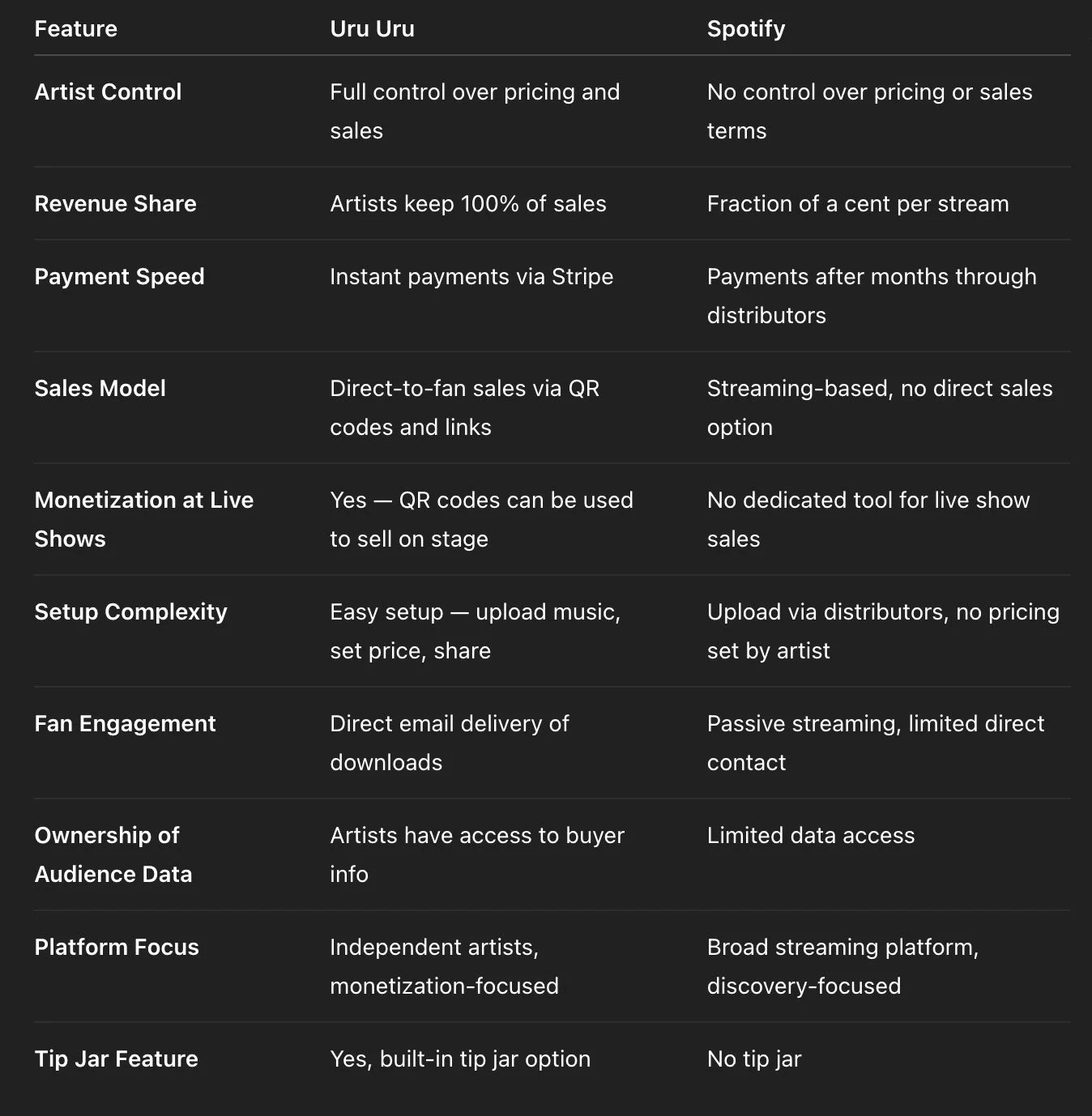
This is exactly why many artists are turning to platforms that give them control — like Uru Uru, where they keep 100% of every sale and get paid immediately through Short answer: No — that phrase is not illegal to use in a song.
“The only thing more powerful than hate is love” is a short, common expression, and phrases like that are generally not protected by copyright law. Copyright protects full works (like lyrics, melodies, recordings), not simple ideas or short lines.
Here’s how it breaks down:
✅ Safe to use: Short phrases, slogans, or common sayings
❌ Not allowed: Copying large portions of someone else’s lyrics or melody
⚠️ Be careful: If the phrase is strongly associated with a specific song/title/brand, you’d want to make sure you’re not copying their entire concept or hook
Real-world perspective
Artists reuse similar ideas all the time:
Love vs hate is one of the most common themes in music
Short lines like this appear across genres (rock, hip-hop, pop, gospel)
My advice (producer to artist)
Use it — but make it yours:
Build a unique melody around it
Add your personal story or message
Flip the phrasing or expand it into a hook
Example twist:
“They preach hate loud, but love speaks louder”
If you want, I can help you turn that line into a full hook or chorus that hits hard for your style 🔥

A clear comparison chart
Uru Uru vs. Spotify